
AI agents made me faster at writing code, then quietly ate the time back. I’d start a few agents, then spend the afternoon watching them: checking which terminal was stuck, re-explaining what one was supposed to be doing, untangling two that edited the same file, and catching the one that started a task that was still waiting on another. The agents were working. I was babysitting.
This post is about how I changed that. Over a few months I rebuilt my development process around three goals: spend my time on decisions instead of supervision, waste less of it waiting and watching, and end up with a process I can trust when I’m not looking. The tool that came out of it is called Flight Deck, but the tool is the smaller part of the story.
Step one: put the plan where agents can read it
The first thing that changed how I work was beads, an issue tracker built for coding agents. Beads is part of Steve Yegge’s family of agent tools: he built beads and Gas Town, Gas Town is built on beads, and Gas City (which he advises) uses beads for its work too. Tasks live in a graph instead of a flat list. Each one can say what it’s waiting on, so an agent can ask “what’s ready?” and get an honest answer. Once my plans were a graph, I stopped writing “do this after that” in notes nobody checks. That’s the foundation everything else sits on.
Step two: run more than one agent at a time
With a task graph in place, the next question was how to run several agents against it at once. That led me to Gas Town, and later Gas City. People tend to lump these three together. They’re related, but they aren’t the same kind of thing:
So beads is the to-do graph, Gas Town is one crew that works from it, and Gas City is a kit for designing your own crew. Both orchestrators keep their work in beads. Both are serious, well-thought-out systems, and I learned a lot from each.
I used them both for real work, and they work. They helped me run more agents than I could have on my own, and a lot of how I think about agent work today came from them. Where I landed is simply that I find it easier to design something the way I already think. I had a flow with Claude Code that fit me, I wanted to keep my time on building my apps, and I wanted to tune things like how many tokens each run uses to my own taste. So in September I stepped back from Gas City and leaned into my own.
Step three: build the process around how I think
Flight Deck started in July as a couple of scripts in my dotfiles. Within a week it had its own repo, and by September it had a board, a dependency map and about 650 commits behind it. The twist is how it got built: I described how I actually work, and AI agents wrote most of the code, tracked in beads, scheduled by the very tool they were building.
Then, on the same day I stepped back from Gas City, I started it over. The first version looked at one project at a time. The new one is ground control for all of them at once: one place to see every project, pick the work, and send it off. Two months and more than 250 commits later, that’s the Flight Deck I use every day.
The process, in three parts
Flight Deck reads the task graph of every project I work on and turns it into a cockpit. It does three jobs, and I keep them deliberately separate:
Every screenshot here is from a throwaway demo project, Skylark, a made-up flight-planning app with fake tasks and fake missions. None of it is real work.
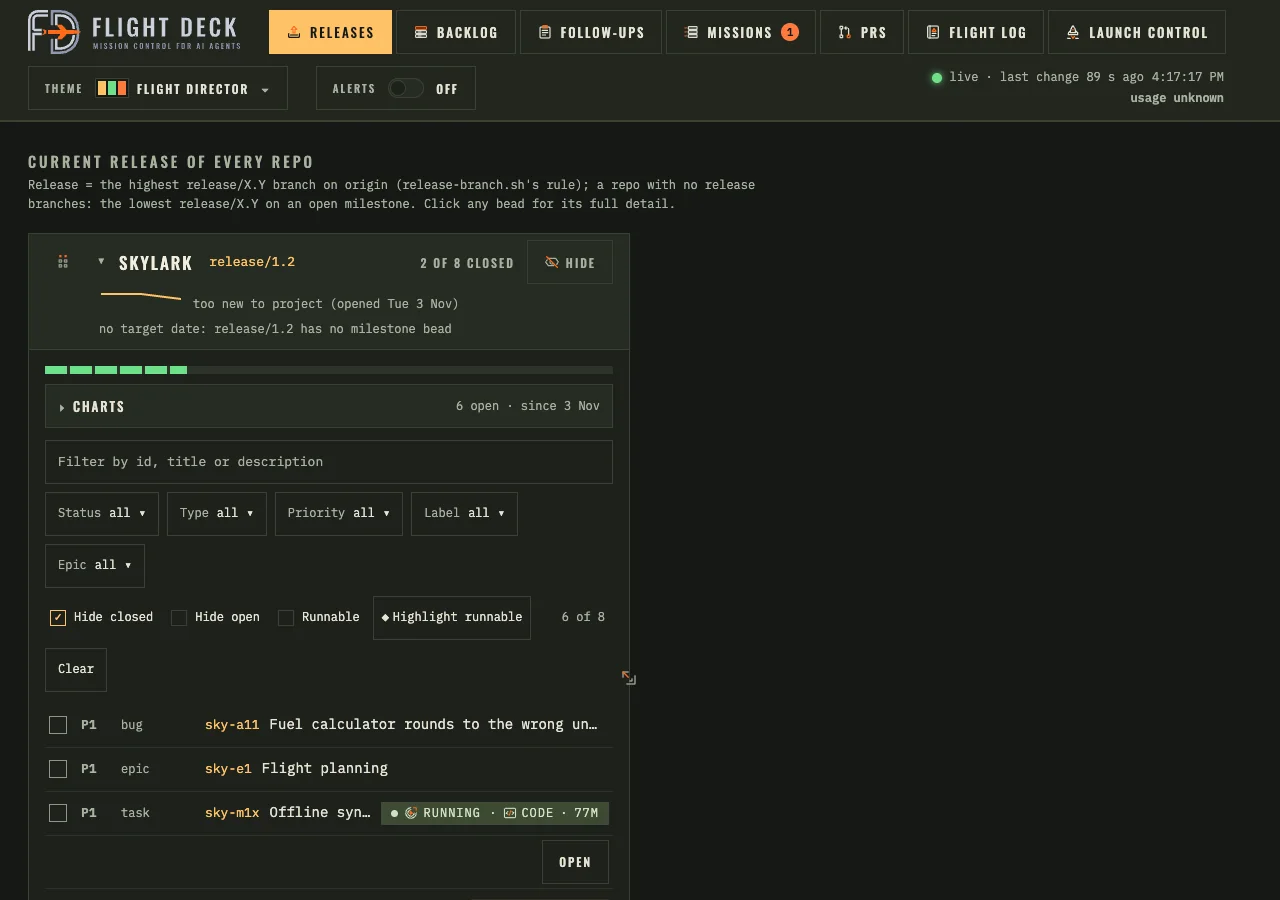
How it picks what can run side by side
The question I used to answer by hand every morning was: which task can I start next without it stepping on another one? Flight Deck answers it in two passes.
- What’s actually ready. Beads already records which task is waiting on which. Flight Deck walks those links and groups the work into waves. Wave one is everything with nothing left to wait on. This part is plain bookkeeping, so it costs no AI tokens at all.
- What would collide. Ready isn’t the same as safe. Two unblocked tasks can still edit the same file and clobber each other. So an AI reviewer reads each ready task, predicts which files it will most likely touch, and checks those guesses against the code itself and the history of related changes, marking each one as confirmed or just a guess.
From that it hands me three things: parallel sets, small groups of tasks with no file in common that can safely run at the same time; conflict pairs, two tasks that touch the same file, and which one should land first; and hot spots, shared files like a route table or a config that make even unrelated tasks collide. If it notices a dependency nobody wrote down, it suggests adding it, but it never adds it on its own. I decide.
There’s a safety net behind that, too: before anything merges, a final check makes sure the pull request really is safe to land: checks green, review comments answered, and GitHub agreeing it can merge. The result is the thing I wanted most: when I sit down, the next bead to run is already picked out, along with the ones it can safely run beside.
A process I can trust
Babysitting comes from not trusting what happens when you look away. So instead of watching agents more closely, I built the checks into the process. Every task becomes a mission that moves through the same stages, gets reviewed before it’s done, and comes to me only when it actually needs me. The missions view is where I check in: each card is one task in flight, which stage it’s in, what it’s doing right now, and whether it’s waiting on me.
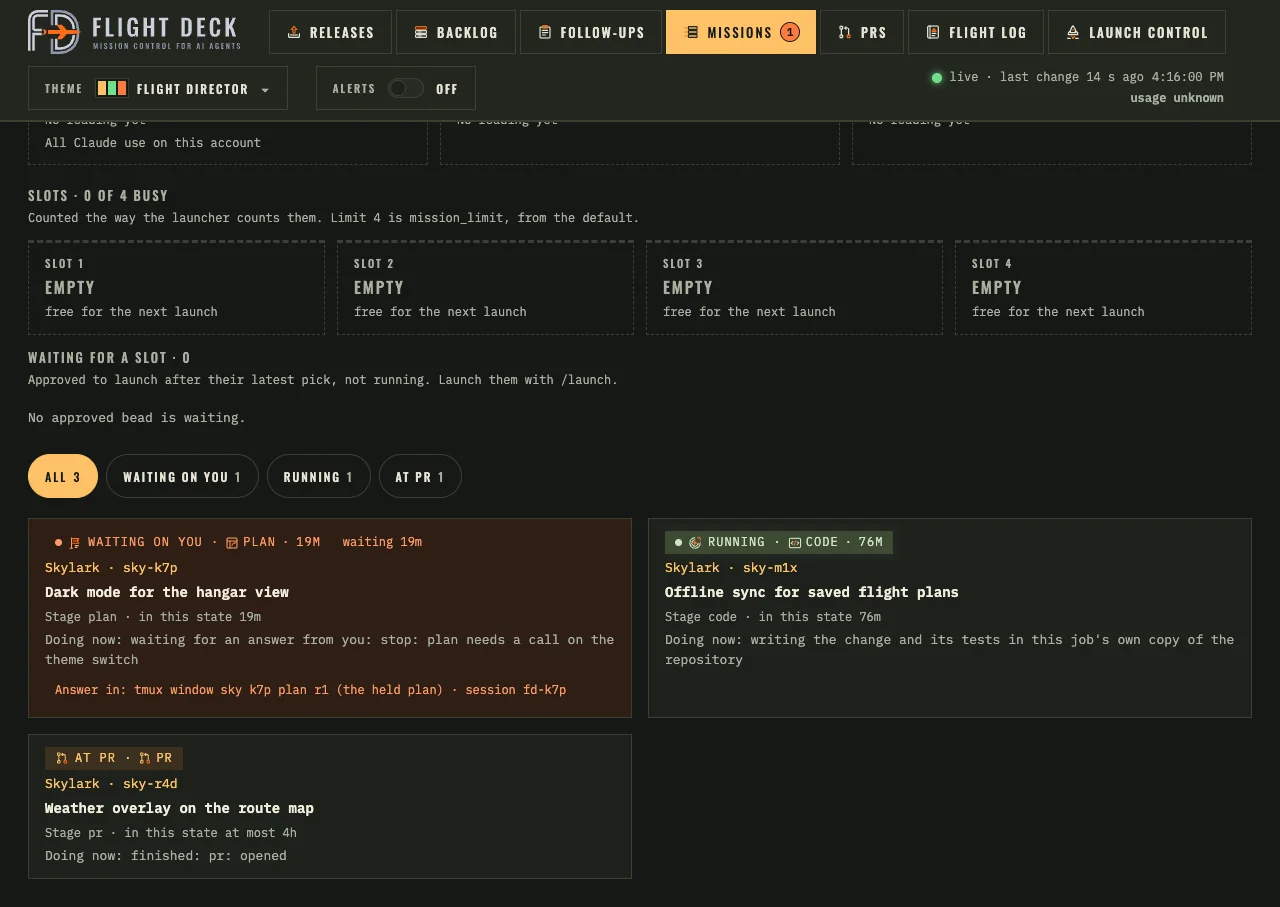
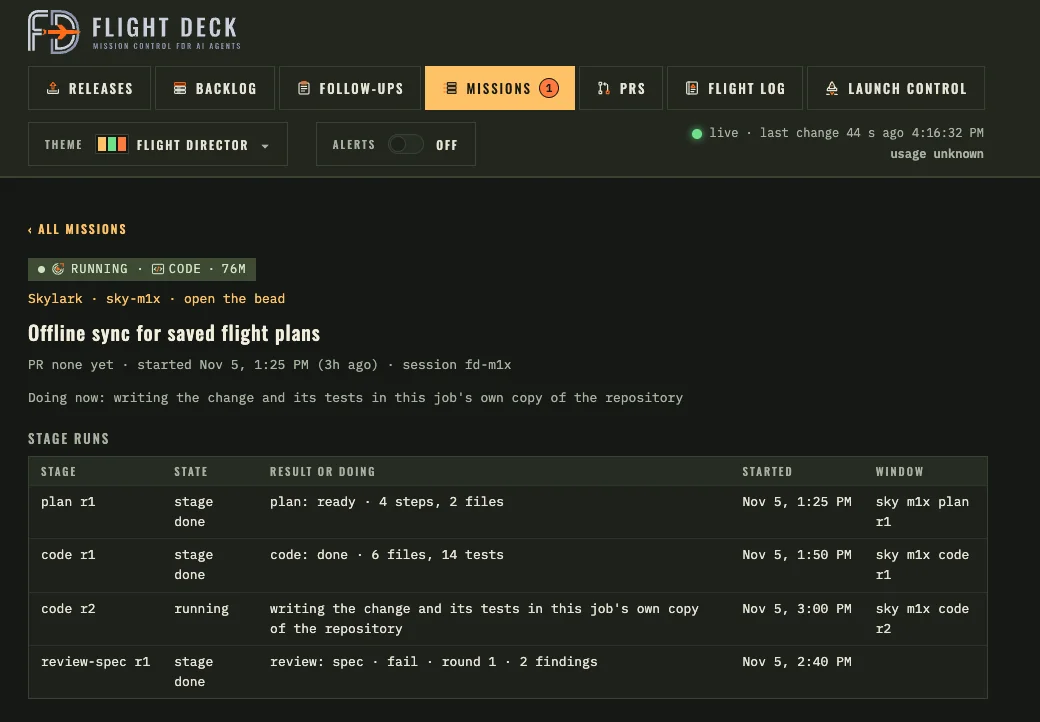
Open a mission and you get its whole run so far, stage by stage. Agents don’t grade their own homework: when a review finds problems, it stops for me, and the fix goes back to code for another round. The page shows exactly that.
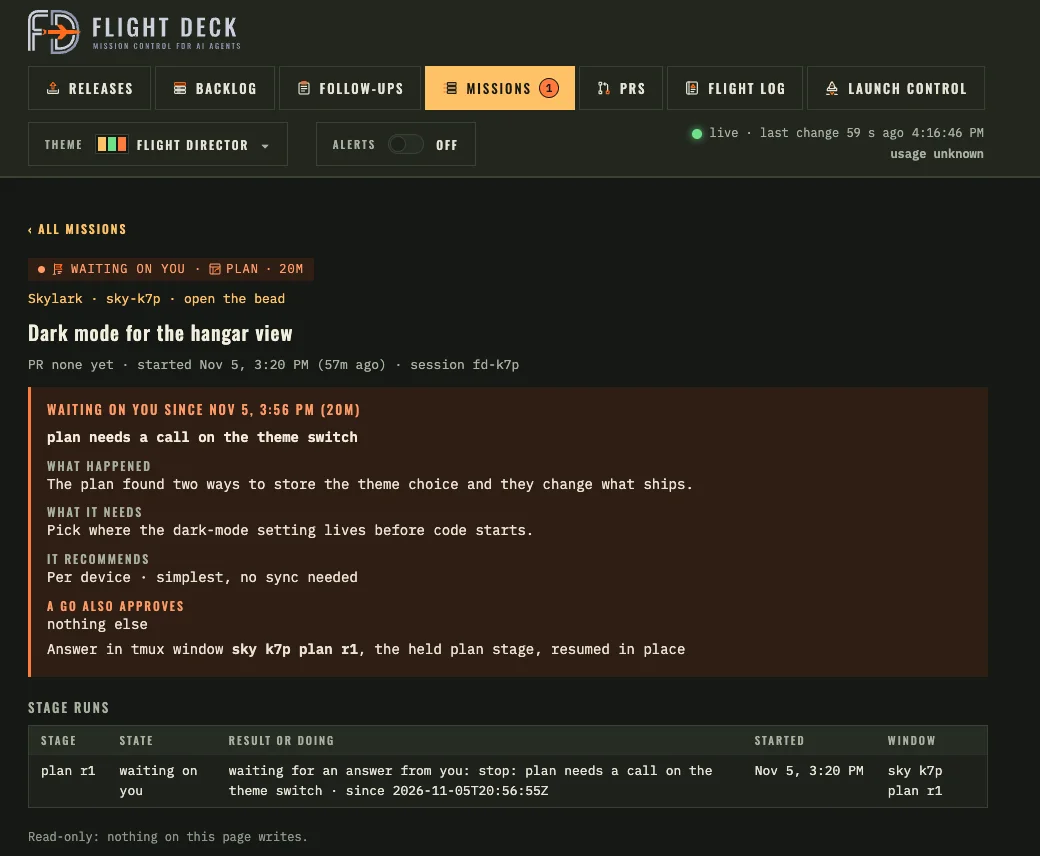
My favorite part is the stop. When an agent hits a decision that’s mine to make, it doesn’t guess. It stops, and says what happened, what it needs, and what it recommends. I answer, and the same stage picks up where it left off.
What changed in my day
- Before: start an agent, watch it, nudge it, start another, lose track of the first, clean up a collision. Most of my attention went to supervision.
- Now: look at the board, pick the work that’s ready and safe to run together, and send it off. Then I go do something else, usually building the next thing.
- When it needs me: a mission stops and tells me what happened, what it needs, and what it recommends. I answer, and it carries on.
- When it’s done: it has already been through review, and I look at a pull request instead of a half-finished session.
My time now goes to the parts only I can do: choosing what to build, making the calls agents shouldn’t make alone, and reviewing finished work. The waiting, the watching and the re-explaining mostly went away. That’s the win, more than any one feature.
And yes, there are rockets
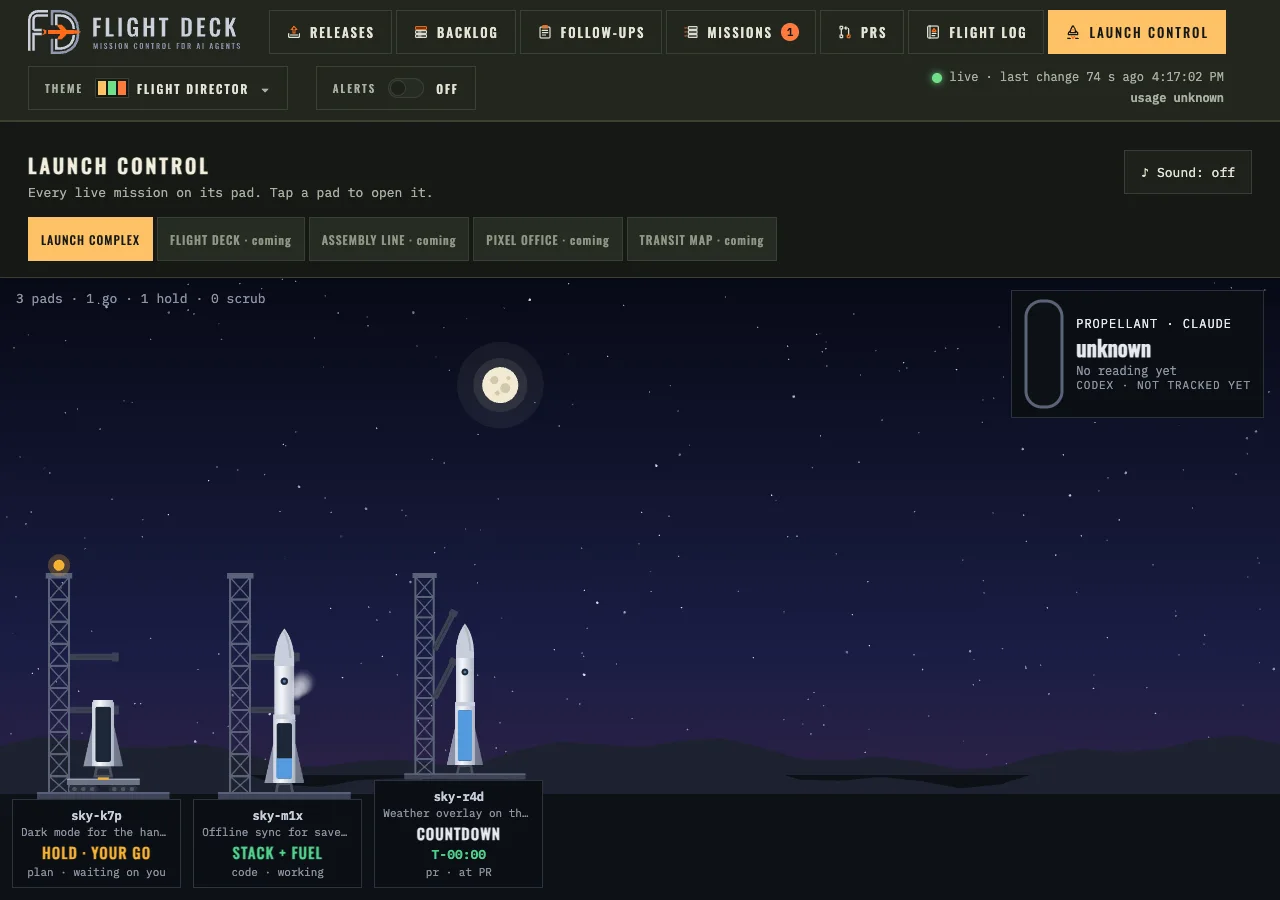
Launch Control puts every live mission on a launch pad. Holding for my go, stacking and fueling while it works, counting down at pull request. It tells me nothing the missions view doesn’t. But it’s a lot more fun to glance at.
Where it started
For comparison, here’s the first version, from before the rebuild. It already had the core idea, sorting work into go and no-go, but only for one project at a time, and nothing to follow a task after it started.
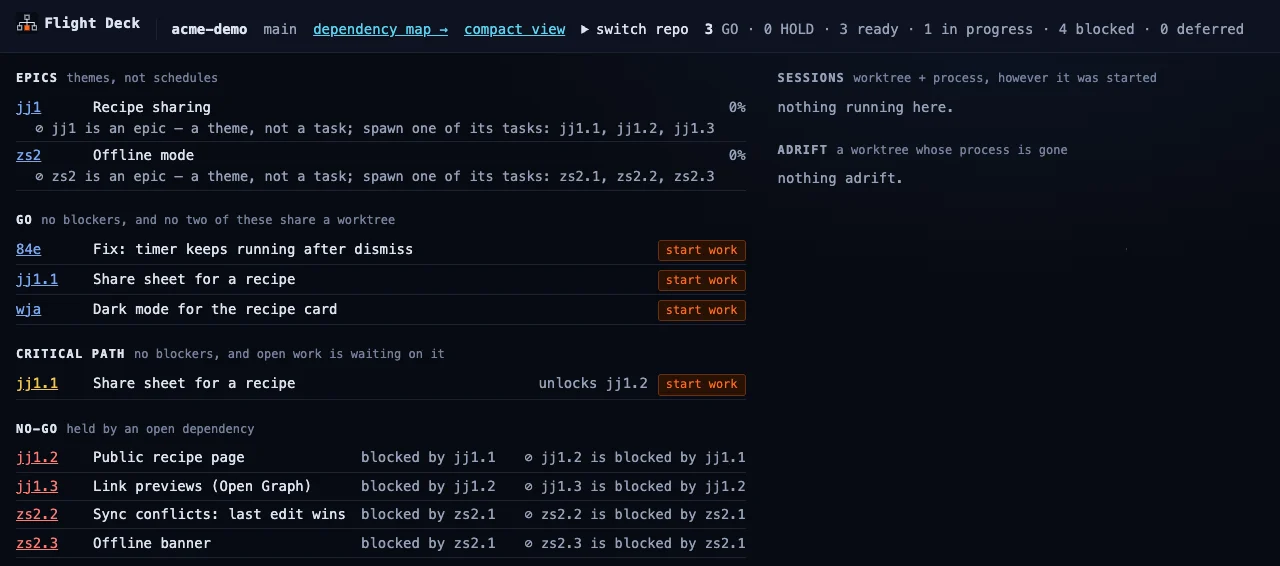
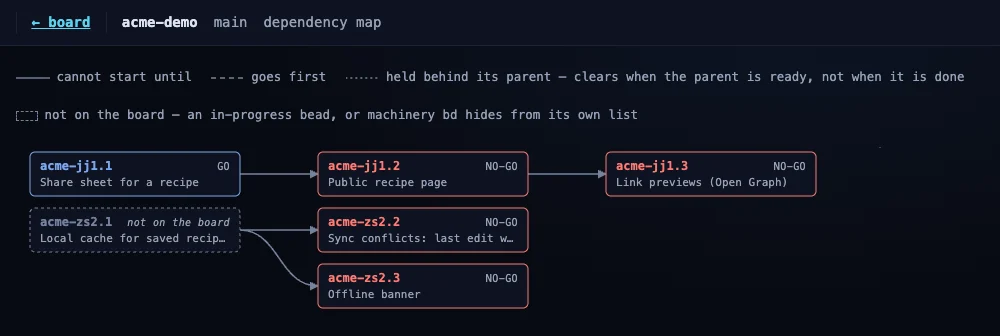
Its first cockpit was a terminal UI. It looked great, and I kept wanting to check on agents from my phone, so it became a web page, and later the whole thing was rebuilt around missions. Letting go of something that worked fine, because something else fit better, turned out to be the theme of the whole project.
Who else is doing this
I’m far from the only one trying to run several coding agents at once. Before and after building Flight Deck, I looked around. A rough map, as of this fall:
| Tool | Where it runs | What it focuses on |
|---|---|---|
| Claude Squad | Your terminal | Many agents side by side, each in its own terminal session and git worktree. |
| Conductor | Mac app | Claude Code, Codex and Cursor agents in parallel, each in an isolated workspace, then you review and merge their changes. |
| Vibe Kanban | Local web board | Kanban cards that drive agents and let you review their diffs. |
| Sculptor | Desktop app | Several coding agents (Claude Code or Codex), each in its own container. |
| Claude Code itself | Terminal, desktop, cloud | Worktree sessions and subagents, built in. |
| Copilot coding agent, Cursor cloud agents, Devin | The cloud | Hand off a task, get a pull request back. |
| Task Master | Alongside your agent | A task manager for AI-driven development, with dependencies between tasks. It organizes the work rather than running the coding sessions. |
They all work, and any of them can help you get more out of AI agents. Each one picks a different place to start: a terminal, a desktop app, a kanban board, the cloud, or a task list. Flight Deck’s starting point is the task graph: what’s ready, what can safely run side by side, then which agents to launch. Its other habit is named stages with stops, so a mission can pause and ask me when a plan hits a fork in the road.
Why I built my own anyway
None of this makes Flight Deck better than any of those tools. They’re built to fit lots of people’s workflows, and mine only has to fit one. That’s the whole point. Here’s what building my own gives me:
- It works the way I already think. I think in missions, stages and stops. When the tool uses my words and my flow, I stop translating and just work.
- I control the token spend. I decide how many agents run, what each one is told, and how much context it carries. I can tune that myself, in code I control.
- It starts from the plan, not the prompt. I want to see what’s ready across every project, which pieces can safely run side by side, and launch only those.
- It asks me at the right moments. A mission stops when it hits a decision that’s mine. For me, answering one good question mid-plan beats untangling a surprise in a finished pull request.
- It shows how releases are going, not just sessions. The board draws each project’s release burn-down and a forecast, so “are we on track?” is a glance.
- It changes when I do. When the terminal UI stopped fitting, it was gone about two weeks after the web page arrived. When one project at a time stopped being enough, I rebuilt it.
Maybe that’s the real lesson. With AI, it’s easy to build a system around the way you already think. If you build with AI and have a flow that works for you, growing your own tool around that flow can be quicker than learning a new one, and it fits how you think and learn from day one. It doesn’t have to be a side project, either: I built Flight Deck a little at a time, while I was building my real apps with it.
What I learned
- A graph beats a to-do list. That’s beads’ big idea, and everything in Flight Deck builds on it. Agents are good at doing a task and bad at knowing which task is safe to do. Put the ordering in the data, not in your head.
- Keep thinking and doing apart. The part that plans never acts on its own. I see the plan, then I say go.
- Isolate everything. Each task gets its own workspace. Most of my early pain was two agents sharing one.
- Make it visible. If I can’t see what’s running at a glance, I stop trusting it.
- Trust the process, not the watching. Review stages and stops did more for my confidence than staring at terminals ever did, and they gave me my afternoons back.
- Build around how you think. Every good tool comes with its authors’ way of thinking. For me, building around mine was the quicker route.
Flight Deck is a personal tool, built for my setup, and I’m not publishing it yet. If there’s interest, tell me and I’ll think about it. Either way, the ideas travel, and I plan to talk a lot more about my development process in future posts here: how I plan work for agents, how I review what they ship, and what I’d do differently. So stick around, and if you’re building something similar, I’d love to hear about it.